

AI has fundamentally changed what it means to be a designer. The role has expanded well beyond visual craft into building, testing, and shipping real products.
With this larger shift at play, it’s clear that the once rigid boundaries between design, product, and engineering are now collapsing. The designers furthest along aren't waiting for the role to be redefined, they're redefining it themselves.
To get a deeper, on-ground view of exactly how this shift is unfolding, we brought together over 40 product designers from Postman, Flipkart, Razorpay, Meesho, Google, SentinelOne, and a dozen other companies.
The conversation surfaced real workflows and use cases that product designers have already built with AI. We also delved deeper into the idea of how the role of the product designer is being rewritten in real time.
3 big lessons from the field about AI in product design
1. AI is the new starting point
“I can't start in Figma anymore.The blank canvas is now a prompt..”
LLMs like Claude, ChatGPT, Gemini have become the place where design thinking happens before a single frame is drawn. Here's how product designers are using Claude as a starting point:
- Research synthesis: Processing user interview transcripts and customer feedback to find themes and contradictions before the team has even aligned on the brief
- Problem structuring: Dissecting the problem statements, generating edge cases, identifying assumptions before committing to a direction
- Microcopy and content: Generating copy variants, error states, empty states, onboarding text in bulk and refined by the designer
- PRDs and alignment docs: Drafting problem requirement docs that would previously have gone to a PM
- Prompting downstream tools: Writing structured inputs that drive Figma Make and Cursor, so the output is usable rather than generic
The new workflow looks a lot like this:
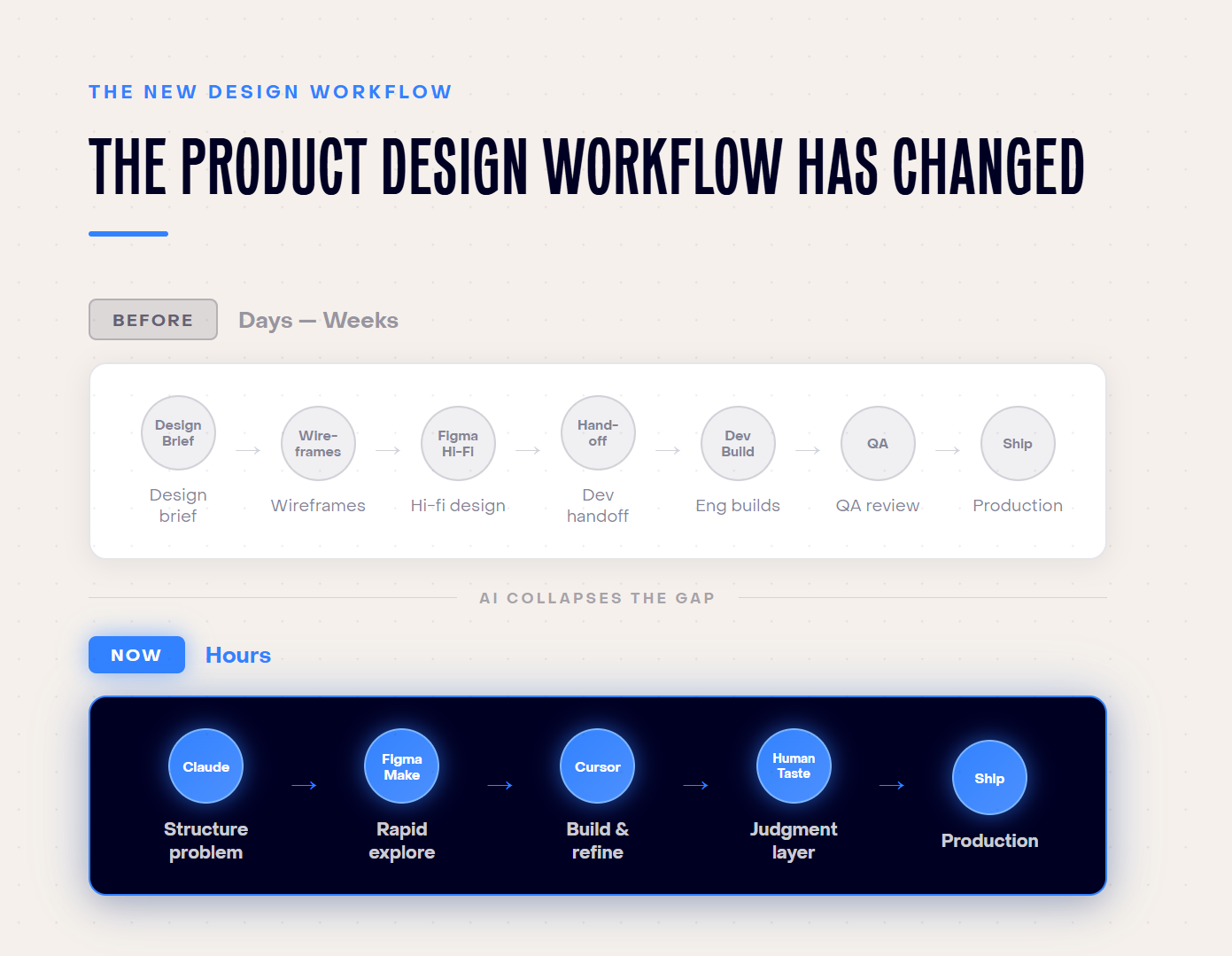
What changes is how drastically this compresses exploration. Ideas that used to take days now take hours. And that faster pace gives designers more time to evaluate options, explore ten directions instead of two, and converge faster on the right one.
2. Design has a new technical floor
We saw a consistent pattern across companies and roles: designers are developing enough technical fluency to operate at the seam between design and engineering, without fully crossing into either.
This includes:
- Raising pull requests
- Running local development environments
- Reviewing API responses to assess feasibility
- Shipping small production tweaks without opening a ticket
- Reading error logs with enough context to identify a front-end issue you can fix yourself
Several designers described variations of this pattern independently.
One used the term bytecoding: learning just enough code to ship and move without waiting. The framing resonated because it captures something more calibrated than "learn to code" and more practical than "design-engineering hybrid."
The signal for the broader field is clear. The companies furthest along in AI adoption are raising the floor of what they expect from design teams: more end-to-end ownership, less handoff dependency.
3. Every designer is building their own stack
No two designers in our meetup had the same setup of tools. While there definitely is a shared base with some combination of Claude, Figma Make, and Cursor, what they build on top is entirely personal.
For instance, one designer records voice notes in Bangla and converts them into structured prompts, and another uses Apple's desktop AI to analyze screenshots before they enter any design tool. A third designer shared how they’d built an AI tool trained on the accumulated knowledge of their team’s content designer, making that expertise accessible to the whole team.
We’re seeing more and more designers tailoring workflows to how they think, how their teams operate, and what their specific products require. They’re building around real constraints rather than waiting for a standardized solution.
The friction of assembling something personal is part of the value. It produces genuinely useful workflows precisely because they’re shaped by actual work.
How the product design role is changing with AI
When AI handles low-level execution, like generating options, specifying components, writing copy variants, designers' focus shifts to the work centered on human judgment. That means defining what should exist, and why.
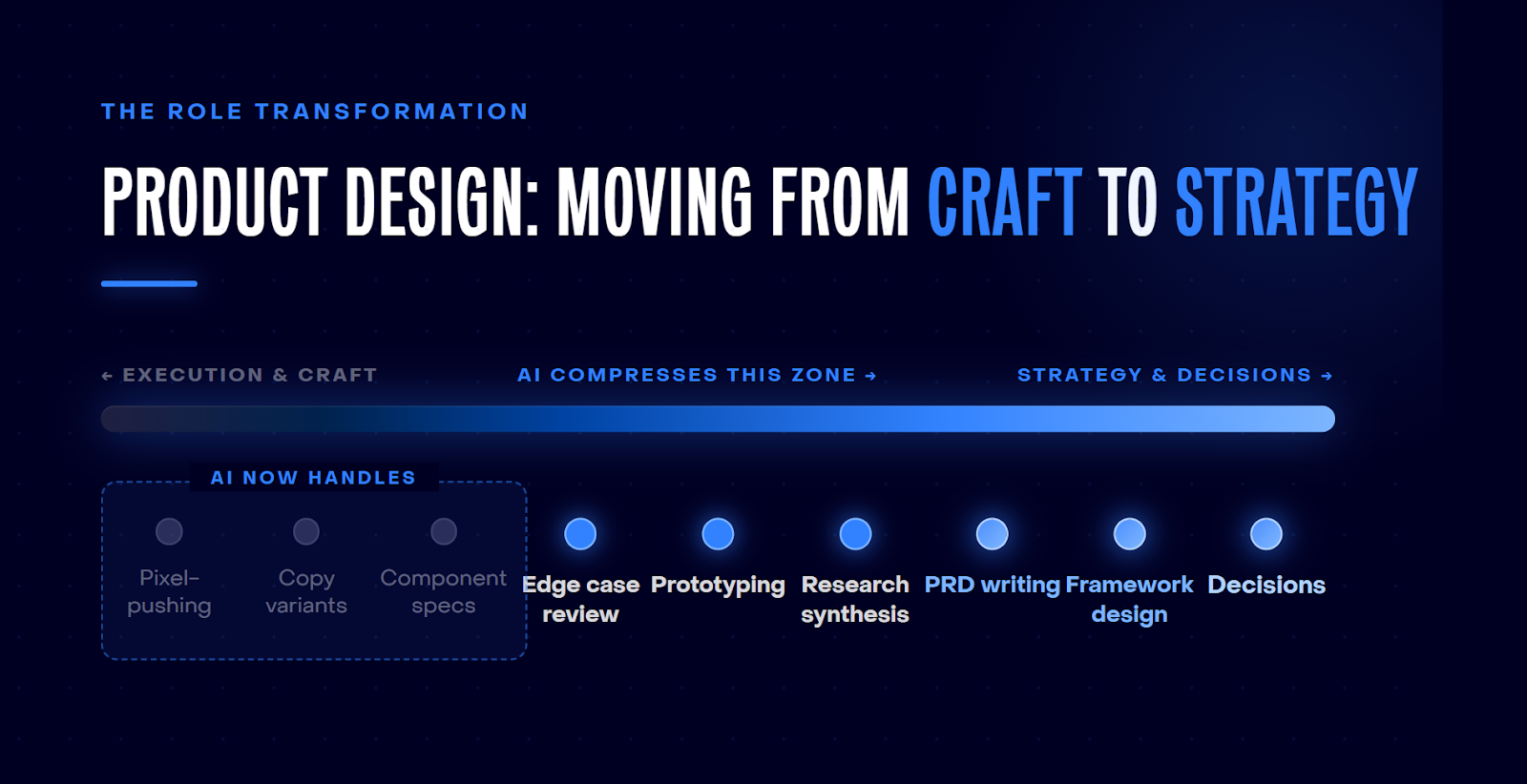
Here's where that recovered time from outsourcing repetitive execution work to AI is going.:
- Building strategic frameworks for how entire teams run product experiments
- Writing PRDs and owning alignment across product and engineering
- Prototyping directly in code, skipping the Figma handoff loop entirely
- Setting up Slack agents to pull GitHub issues and customer feedback in real time
- Staying closer to users without waiting for a sprint cycle to unlock access
The PM role is shifting alongside this.
When designers can access user data directly, build functional prototypes, and ship to production, the traditional handoff model starts to dissolve. As one designer put it:
The difference between product work and design is blurry now.
5 skills product designers are building now
The role is shifting fast. The question on most designers' minds is where to invest their time to keep up. Here are five areas that product designers are focusing on.
1. Cross-functional problem definition
Designers are moving upstream. With AI to synthesize research quickly, they're framing problems before the PM has written the brief. Their proximity to users gives them a structural advantage at this stage.
In practice
A designer who can frame the problem before the first engineering conversation can save two days of alignment. One designer described spending their recovered time building strategic frameworks for how their entire team should run product experiments.
Another org had to deliberately constrain PM prototyping to concept-level only, because keeping the designer in the loop on problem definition had become non-negotiable for product quality.
2. Writing for machines, not just humans
Structuring information clearly for AI tools to act on is becoming a core design skill.
Vague prompts produce vague output. Prompts that specify layout intent, interaction behavior, edge cases, and context produce output that's actually usable.
This extends into PRDs and other artifacts that have traditionally belonged to PMs.
Some designers now go straight from a structured problem statement to a production-ready front-end, with AI handling the middle steps. Others are reviewing API responses and raising their own PRs because AI has made the engineering layer legible enough to engage with on their own terms.
3. Prototyping directly in code
Tools like Cursor and Lovable have fundamentally lowered what it takes to build something that behaves like real software.
Prototypes built in code carry constraints and context that Figma mocks don't. They respond, break, and surprise you in ways a static frame never will. Designers who prototype in code skip an entire handoff loop.
In practice
A designer shared how they built 25+ prototypes for a large-scale platform entirely through Cursor and prompts, without opening Figma once.
In Figma, you build by stacking bricks. In agent coding, you start with something large and rough and sculpt it down. Once you've internalized the environment, mock-only feels like working with half the picture.
4. System-level thinking > Screen-level thinking
When AI generates screen options on demand, judgment becomes the most important skill. You have to know which option is right, and why.
That kind of judgment comes from zooming out from individual screens to the frameworks that govern how an entire product behaves.
This includes mapping where the product breaks across touchpoints, thinking about what should and shouldn't be built, and encoding design expertise into shared resources rather than keeping it in one person's head.
In practice
One team split projects into two explicit modes: front-end-heavy work where the designer leads, and product-heavy work where PM and designer combine. Knowing which mode you're in, and operating accordingly, is itself a systems skill.
5. Defining how AI behaves with users
As more products become AI-powered, someone needs to define how the AI should behave. You have to consider what your product says, when it defers, where it fails gracefully. Designers are uniquely positioned to own this, and it's arguably the most forward-looking capability on this list.
The gap between a polished AI demo and a product that holds up under real user conditions is a design problem. AI breaks under inputs it wasn't built to handle like ambiguous requests, unexpected context, edge cases the team didn't anticipate.
Designers who understand both how users behave and where AI falls short are the ones who can close that gap intentionally, before it surfaces in production.
AI is leveling up product design
“You can build anything you want now. You just have to know what to build.”
The message is clear. Execution has become cheap. The constraint has shifted to clarity about what's worth building, for whom, and why. Taste, judgment, and the ability to define a real problem and own it end-to-end - these are the capabilities that matter the most now.
.png)